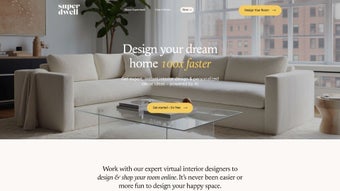

Download Superdwell – Free Online Home Design Tool, Interior Planner & Shopping App
Overview
Superdwell is a cloud‑based interior‑design platform that transforms the often‑daunting process of planning a home makeover into a playful, drag‑and‑drop experience. The service runs entirely in a modern web browser, which means there is no bulky installer, no license key, and no regular patch cycle. Users simply sign up, launch the application, and begin sketching floor plans, adding walls, doors, and windows with pixel‑perfect precision.
Once the structural layout is set, an extensive library of 3D furniture, lighting, and décor items becomes available for instant placement. What truly differentiates Superdwell from other free design tools is the seamless integration of shopping: every piece placed on the canvas can be added to a secure checkout cart that links directly to partnered retailers, allowing the design to become a ready‑to‑order shopping list in seconds. The platform also offers on‑demand professional designer support.
A free 15‑minute consultation can be requested, during which a certified interior designer reviews the plan, suggests improvements, and helps keep the project within budget. Because all data is stored in an encrypted cloud environment, users can access their projects from any device—desktop, tablet, or smartphone—without worrying about version control. Whether you are a first‑time renter experimenting with colour schemes, a DIY homeowner tackling a single‑room refresh, or a professional architect needing rapid visual mock‑ups, Superdwell provides a secure, intuitive, and completely free environment that eliminates the steep learning curve of traditional CAD software while delivering powerful visualisation tools.
Features & Benefits
- Drag‑and‑Drop Floor Planner – Create walls, doors, and windows with a few clicks and instantly resize rooms.
- Extensive 3D Furniture Library – Thousands of items from top manufacturers, filterable by style, price, and material.
- Real‑Time Color & Material Swatches – Apply paints, wallpapers, and flooring finishes and see changes instantly.
- Integrated Shopping Cart – Add any placed item to a checkout list that links directly to retailer sites for secure purchase.
- Professional Designer Support – Request a free 15‑minute design review, receive personalised advice, and download a polished presentation.
- Responsive Web Interface – Optimised for desktops, tablets, and smartphones; no plug‑ins required.
- Cloud Save & Share – Store unlimited projects, export high‑resolution images, or share a public link with collaborators.
- Version History – Revert to previous design stages, compare iterations, and track design evolution.
Users consistently praise Superdwell for striking a balance between depth and simplicity. Novices appreciate the guided tutorials, clean UI, and the ability to see a realistic 3D rendering within seconds. Advanced designers value the precise dimension controls, the capacity to experiment with high‑end furniture, and the direct purchasing workflow that eliminates the need to switch between separate design and e‑commerce platforms.
The free tier supplies enough functionality for hobbyists and casual remodelers, while optional premium consultations unlock deeper expertise for complex projects. Security is baked in: all communications use HTTPS, and project files are encrypted at rest on compliant cloud servers. The platform’s performance remains smooth on most mid‑range laptops, and the collaborative sharing feature makes it easy to involve contractors, family members, or design teammates in real time.
Overall, Superdwell delivers a professional‑grade visualisation suite without the price tag traditionally associated with such tools.
Superdwell delivers a surprisingly powerful interior‑design suite for free. The drag‑and‑drop planner feels intuitive, the furniture catalog is impressively curated, and the ability to purchase items directly from the canvas is a game‑changer. The only downside is occasional lag on very large projects, but overall it remains a top choice for anyone looking to visualize and shop for home décor in one place.
Installation, Compatibility & Usage Guide
Zero‑Download Access
Because Superdwell is fully browser‑based, there is no traditional installation process. Users simply visit www.superdwell.com, register with an email or social account, and begin designing immediately. The application leverages HTML5 and WebGL, ensuring smooth 3D rendering without any additional plug‑ins or local software.
System Requirements & Operating Systems
- Supported Operating Systems – Windows 10/11, macOS 10.15+ (Catalina), Linux distributions with recent kernels, Chrome OS, Android (Chrome browser), iOS (Safari).
- Recommended Browsers – Google Chrome (latest), Mozilla Firefox (latest), Microsoft Edge (Chromium), Safari 14+.
- Hardware Minimum – 4 GB RAM, dual‑core CPU, GPU supporting WebGL 2.0 (most integrated graphics from the past five years qualify).
- Internet Connection – Stable broadband (≥5 Mbps) for quick loading of the 3D asset library.
Superdwell works on Windows, macOS, Linux, Chrome OS, Android, and iOS browsers, making it a truly cross‑platform solution for designers on the go.
Step‑by‑Step Usage
- Create a New Project – Click “New Project,” name your design, and choose the property type (apartment, house, office).
- Draw the Floor Plan – Use the wall tool to outline rooms, then add doors, windows, and structural elements.
- Populate with Furniture – Browse the library, drag items onto the plan, and rotate or resize as needed.
- Apply Materials – Select paint colours, flooring textures, or wall coverings from the Materials tab; changes appear instantly.
- Save & Share – Store the project in the cloud, export high‑resolution images, or generate a shareable link for collaborators.
- Shop Directly – Click “Buy Now” on any item to add it to a checkout cart that forwards you to the retailer’s site.
- Request Professional Review – Submit the design for a free 15‑minute consultation; a certified designer will respond with suggestions and a printable report.
Conclusion – Pros, Cons, FAQ & Call to Action
Pros & Cons
- Completely free core features – no hidden fees for basic design.
- Intuitive drag‑and‑drop interface suitable for beginners and pros.
- Large, curated furniture library with direct purchase links.
- Cloud‑based storage and easy sharing across devices.
- Access to professional interior designers for personalised advice.
- Responsive design works on desktops, tablets, and smartphones.
- Very large projects may experience occasional lag on low‑end hardware.
- Advanced rendering options (e.g., ray‑traced lighting) are unavailable in the free tier.
- Some premium furniture brands are only reachable through partner retailers.
- Constant internet connection required; offline work is not supported.
Frequently Asked Questions
Is Superdwell really free to use?
Yes. All essential design tools, the full furniture library, and cloud storage are available at no cost. Paid professional consultations are optional and not required to create or export designs.
Can I export my design for contractors?
Superdwell supports exporting high‑resolution PNG, JPEG, and PDF layout reports. For CAD‑compatible DWG/DXF files you can request a premium export during a designer consultation for an additional fee.
Do I need a powerful computer to run Superdwell?
The platform runs smoothly on most modern laptops and tablets that meet the minimum requirements (4 GB RAM, dual‑core CPU, WebGL‑compatible GPU). Very large projects with many 3D objects benefit from higher‑end hardware.
How secure is my data?
All data transmission uses HTTPS encryption, and project files are stored on compliant cloud servers with regular security audits. Two‑factor authentication is available for added protection.
Can I collaborate with teammates?
Yes. By sharing a project link, collaborators can view, comment, and, if granted permission, edit the design in real time, making teamwork seamless.
Superdwell stands out by delivering a complete, browser‑based interior‑design solution that combines powerful visualisation, an integrated shopping experience, and optional professional support—all without charging for core features. Its intuitive interface lowers the barrier for beginners, while its depth satisfies seasoned designers. Because there is no software to install or update, you can start creating immediately from any device, and your projects stay safe in the cloud.
Ready to transform your ideas into a purchasable reality? Create your free account now, launch a new project, and discover how effortless home design can be with Superdwell.



.png)



